


Glossary
- EPFO full form: Employees’ Provident Fund Organisation
- EPFO: A statutory body under the Ministry of Labour and Employment, Government of India
- EPF: Employees’ Provident Fund, a retirement savings scheme
- UAN: Universal Account Number linked to all EPF accounts of an employee
- EPS: Employees’ Pension Scheme
- EDLI: Employees’ Deposit Linked Insurance
- EPFO member: An employee enrolled under EPF
- EPFO member portal: Online platform for EPF services
- EPFO unified portal: Single digital portal for members and employers
EPFO Full Form
The EPFO full form is Employees’ Provident Fund Organisation.
EPFO Meaning
EPFO meaning refers to a government-run organisation which is a government body that works under the Ministry of Labour and Employment, Government of India. It manages long-term savings by collecting monthly contributions from both employers and employees.
It is the authority that manages provident fund, pension, and insurance benefits for salaried employees in India. It ensures that employees save a part of their salary every month and receive financial support after retirement or during emergencies.
Official EPFO Definition
The Employees’ Provident Fund Organisation (EPFO) is a statutory body established under the Employees’ Provident Funds and Miscellaneous Provisions Act, 1952. It functions under the Ministry of Labour and Employment and oversees social security schemes for India’s workforce. It is responsible for administering EPF, EPS, and EDLI schemes for eligible employees and establishments across India.
What is EPFO and Why was it Created?
Employees’ Provident Fund Organisation is one of the largest social security organisations in the world. It plays a key role in employee welfare by helping salaried individuals build long term savings. Through EPFO, employees get retirement income, pension benefits, and insurance coverage. It also promotes financial discipline and security.
EPFO was created to provide:
- Retirement savings
- Pension benefits
- Life insurance cover
It is one of the largest social security organisations in the world, serving millions of employees across India.
History of Employees’ Provident Fund Organisation
EPFO was established in 1951 after the Employees’ Provident Funds Ordinance was introduced. In 1952, this ordinance was replaced by the Employees’ Provident Funds and Miscellaneous Provisions Act, 1952. Since then, EPFO has continuously evolved with digital services and reforms.
Schemes Managed by EPFO
EPFO manages three main schemes:
- Employees’ Provident Fund Scheme, 1952: Helps employees save for retirement.
- Employees’ Pension Scheme, 1995: Provides monthly pension after retirement.
- Employees’ Deposit Linked Insurance Scheme, 1976: Offers insurance cover to employees.
Learn more about Employees’ Provident Fund Act.
What is EPFO UAN and Why it Matters?
EPFO UAN is a 12-digit number assigned to every employee. It remains the same even when you change jobs.
With Employees’ Provident Fund Organisation UAN login, members can:
- View EPFO member passbook
- Submit EPFO online claim
- Track EPFO claim status
- Update EPFO KYC
- Access EPFO unified member portal
Learn more about UAN Meaning | Definition.
About EPFO Member & EPFO Member Portal
An Employees’ Provident Fund Organisation member is any employee registered under the EPF scheme. Members can access their account through the EPFO member portal.
Using the EPFO member portal login, members can:
- Check EPFO member passbook
- Track claim status
- Update EPFO KYC
- Apply for EPFO online claim
- Download UAN card
How To Do EPFO Login and Get Member Portal Access?
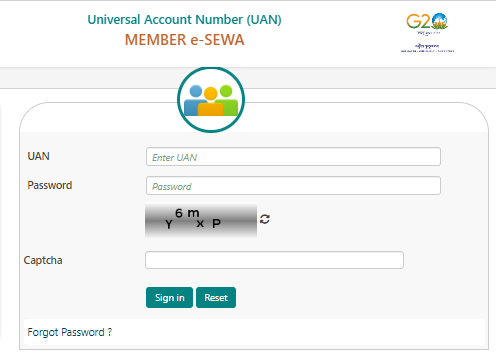
Follow these steps for Employees’ Provident Fund Organisation Member Login:
Step 1: Visit the EPFO member portal login
Step 2: Enter UAN and password
Step 3: Complete captcha
Step 4: Click Sign In
Once logged in, the EPFO member home allows access to balance, claims, passbook, and profile details.
How To Do EPFO UAN Activation?
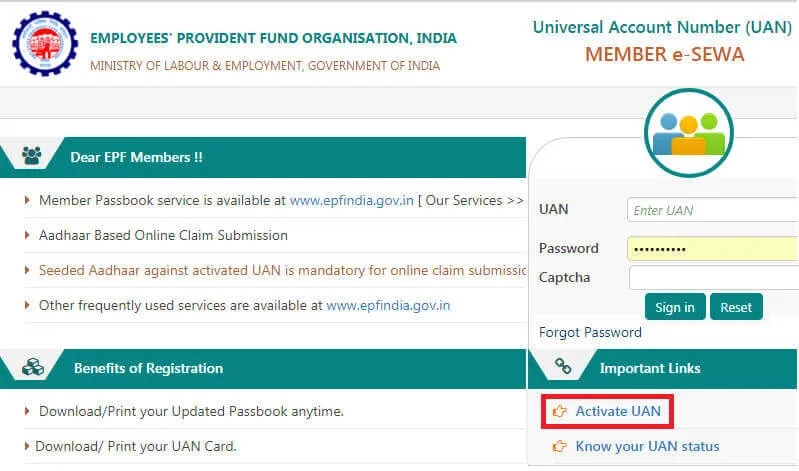
EPFO UAN activation is mandatory before using online services.
Following are the steps for EPFO UAN Activation:
Step 1: Visit EPFO member portal
Step 2: Click on Activate UAN
Step 3: Enter UAN, Aadhaar, and mobile number
Step 4: Verify OTP
Once activated, the Employees’ Provident Fund Organisation UAN remains the same even after job changes.
How To Do EPFO Password Change and EPFO Password Reset?
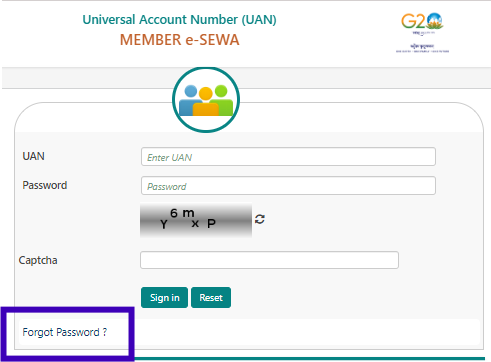
If you forget your password, EPFO password reset is simple.
Following are the steps for EPFO Password Change:
Step 1: Go to EPFO portal login page
Step 2: Click on Forgot Password
Step 3: Enter UAN and verify OTP
Step 4: Set a new password
This completes EPFO password change.
What is EPFO KYC and Why is it Important?
EPFO KYC means Know Your Customer, and it is used to verify an employee’s basic details like Aadhaar, bank account, and PAN in the Employees’ Provident Fund Organisation system.
Completing EPFO KYC ensures:
- Faster claim settlement
- No claim rejection
- Smooth EPFO UAN activation
- Documents include Aadhaar, PAN, and bank details.
How to Update Bank Details in EPFO?
Follow these steps to update your bank details on the EPFO portal:
Step 1: Log in to the EPFO portal using your UAN.
Step 2: Go to the “Manage” section and select “KYC.”
Step 3: Under the KYC update section, click “Bank.”
Step 4: Enter your new bank account number and IFSC code, then submit.
Once the employer approves the new details, they will be updated in your Employees’ Provident Fund Organization account.
How to Change Mobile Number in EPFO?
To change your mobile number on the EPFO portal, follow these steps:
Step 1: Log in to the EPFO portal using your UAN and password.
Step 2: Click on the “Manage” tab and select “Contact Details.”
Step 3: Update your mobile number and submit.
Step 4: Verify with the OTP sent to the new number
Now, the changes will reflect in your Employees’ Provident Fund Organization account.
How to Link Aadhar with EPFO?
Linking your Aadhaar with your EPFO account ensures smooth claim processing. For this, follow these steps:
Step 1: Log in to the EPFO portal using your UAN.
Step 2: Go to the “Manage” tab and select “KYC.”
Step 3: Under the KYC section, click on “Aadhaar.”
Step 4: Enter your Aadhaar number and submit.
Once verified by the Employees’ Provident Fund Organization, your Aadhaar will be linked to your account.
EPFO Contribution and Interest Rate
Both employee and employer contribute to EPF.
Contribution | Percentage |
Employee | 12% |
Employer | 13% |
Current EPF interest rate is 8.25% per annum.
What is an EPFO Member Passbook?
The EPFO member passbook shows:
- Monthly contributions
- Employer share
- Interest credited
- Transfer details
It can be accessed through EPFO login passbook on the portal.
What is an EPFO Claim or EPFO Online Claim?
EPFO claim refers to withdrawing or settling PF or pension amounts.
Types of EPFO claim:
- Final settlement
- Partial withdrawal
- Pension withdrawal
Members can submit EPFO online claim through the Employees’ Provident Fund Organisation unified member portal.
How to Claim EPF?
Claiming your Employee Provident funds can be done through the EPFO portal as follows:
Step 1: Log in to the EPFO member portal using your UAN and password.
Step 2: Navigate to the “Online Services” tab and click on “Claim (Form-31, 19 & 10C)”.
Step 3: Verify your KYC details, such as your Aadhaar, bank account, and PAN.
Step 4: Select the type of claim you want (full EPF settlement, part withdrawal, or pension withdrawal).
Step 5: Submit the claim form after entering the required details.
Your claim status can be tracked on the Employees’ Provident Fund Organization portal.
How to Withdraw Money From EPFO?
To withdraw money from your EPFO account, you can follow these steps:
Step 1: Log in to the EPFO portal using your UAN number and password.
Step 2: Under “Online Services,” click “Claim (Form-31, 19 & 10C).”
Step 3: Enter the last four digits of your bank account linked with EPFO.
Step 4: Select the type of withdrawal (final settlement, partial withdrawal, or pension withdrawal).
Step 5: Complete the application and submit it.
The withdrawal amount will be credited to your bank account linked with your Employees’ Provident Fund Organization account.
How to Check EPFO Claim Status?
After submitting a claim, members can check EPFO claim status online.
Following are the methods to Check EPFO Claim Status:
Method 1: Through EPFO Member Portal Login
Visit the official EPFO member portal website. Log in using your UAN number and password. After logging in, go to the “Online Services” section and click on “Track Claim Status.” Your claim details will appear on the screen, showing whether the claim is under process, approved, or settled.
Method 2: Using the UMANG EPFO App
Download the UMANG app from the Google Play Store or Apple App Store. Open the app and search for “EPFO.” Log in using your UAN and OTP. Once logged in, select the option to check claim status. The app will display the latest update on your EPFO claim.
Method 3: Using the Missed Call Service
Give a missed call from your registered mobile number to 9966044425. Make sure your UAN is activated and linked with Aadhaar and bank details. After the missed call, you will receive an SMS with details of your EPF balance and the status of your last claim.
EPFO PF Claim Change Rule (Latest Updates)
Recent EPFO updates include:
1. Auto settlement limit increased to ₹5 lakh
EPFO now allows certain claims to be settled automatically up to ₹5 lakh without manual approval. This means eligible members can receive their PF withdrawal faster, especially for medical or emergency needs.
2. Faster claim processing
EPFO has improved its digital systems so that most claims are processed in fewer days than before. This reduces waiting time and helps members get their money quicker.
Learn more about How EPFO Simplifies PF Claim Settlement Process
3. Reduced document requirements
Members no longer need to submit multiple documents for common claims. If Aadhaar, bank details, and KYC are already verified, claims can be processed with minimal paperwork.
4. Aadhaar alternatives for specific workers
For workers who do not have Aadhaar or face verification issues, EPFO has introduced alternative identity options. This ensures that genuine workers are not denied EPF benefits due to Aadhaar-related problems.
These changes aim to simplify withdrawals.
EPFO Pension and PPO Number
EPFO pension is managed under EPS. After retirement, eligible members receive a PPO number, which helps track pension payments.
The PPO (Pension Payment Order) Number in the EPFO is a unique 12-digit number assigned to retirees who are eligible for pension benefits. This number helps pensioners track their pension disbursements. EPFO issues the PPO number once the employee retires and their pension is processed. Know your PPO Number.
What are NCP days in EPFO?
NCP (Non-Contributory Period) Days in the EPFO represent the days during which the employer has not made any contributions to the employee’s EPF account. NCP days typically occur when an employee is on leave without pay or absent from work. These days are reflected in the employee’s EPFO record and impact the overall EPF contribution.
EPFO Employer Login
Employers use the EPFO employer portal to:
- Approve employee KYC
- File returns
- Make PF payments
- Manage compliance
This is done through the EPFO employer login section on the unified portal.
EPFO Grievance and Helpline
Members can raise complaints through:
- EPFO e Sewa portal
- EPFO helpline number: 1800 118 005
Common issues include delays, claim rejection, and transfer problems.
EPFO Website and Unified Portal
All services are available on:
- EPFO website: epfo gov in
- Unified portal EPFO
Members can access EPFO home login anytime.
Latest News to Know
EPFO has introduced the Employees’ Enrolment Scheme 2025 to bring workers into EPF who were not enrolled earlier between 1 July 2017 and 31 October 2025. The scheme will be open for six months, from 1 November 2025 to 30 April 2026.
Under this scheme, employees do not need to pay their share of EPF contribution for the past period. Employers only have to pay their own contribution, interest, administrative charges, and a small penalty of ₹100. Even establishments that are already under inquiry, such as cases under Section 7A, Para 26B, or Para 8, can benefit from this scheme.
The main goal of this scheme is to increase EPF coverage and support the government’s vision of providing social security for all workers in India.
EPFO’s Role in Employee Welfare
EPFO plays a critical role by:
- Promoting retirement savings
- Providing pension security
- Offering insurance benefits
- Supporting financial emergencies
It supports the government’s vision of social security for all.
Conclusion
EPFO is more than just a retirement fund. It is a long-term financial safety net for employees. With digital services like EPFO unified portal, EPFO UAN login, and EPFO online claim, managing provident fund has become simpler and faster than ever.
Understanding EPFO helps employees make informed decisions and secure their financial future.
Frequently Asked Questions (FAQs)
How to Change EPFO Password?
To change your EPFO password, go to the EPFO member portal login page and click on “Forgot Password.” Enter your UAN and captcha, verify the OTP sent to your registered mobile number, and then set a new password. Once submitted, your EPFO password will be updated and you can log in using the new password.
How to Update Bank Details in EPFO?
To update bank details in EPFO, log in to the EPFO member portal using your UAN and password. Go to the “Manage” section and click on “KYC.” Select “Bank,” enter your new bank account number and IFSC code, and submit the request. The updated bank details will reflect in your EPFO account once your employer approves the change.