

Quick Summary: UAN (Universal Account Number) is a permanent 12-digit number issued by EPFO (Employees’ Provident Fund Organisation) to every EPF member. It links all your PF accounts across employers under one number and never changes, even when you switch jobs.
Key Facts at a Glance
Attribute | Detail |
|---|---|
Full Form | Universal Account Number |
Issued By | EPFO (Employees’ Provident Fund Organisation) |
Under | Ministry of Labour and Employment, Govt. of India |
Digits | 12 |
Launched | October 1, 2014 (by PM Narendra Modi) |
Portability | Stays the same throughout an employee’s career |
Who Gets It | All EPF contributors — salaried employees and contract workers |
Portal | unifiedportal-mem.epfindia.gov.in |
Helpline | 1800-118-005 (Toll Free) |
UAN Full Form
UAN full form: UAN stands for Universal Account Number.
What is UAN?
A UAN number is the 12-digit Universal Account Number that Employees’ Provident Fund Organisation (EPFO) issues to every employee contributing to the Employee Provident Fund (EPF). It is issued under the authority of the Ministry of Labour and Employment, Government of India, and governed by the Employees’ Provident Funds and Miscellaneous Provisions Act, 1952.
The UAN acts as a parent account — an umbrella that links all EPF Member IDs created by different employers over the course of a career. Instead of managing multiple disconnected PF accounts, employees can track, transfer, and access all their PF records through this single number.
EPFO and UAN: How They're Connected
The EPFO UAN link is straightforward. Your UAN is the identity. EPFO is the authority that issues it and manages everything behind it.
EPFO — the Employees’ Provident Fund Organisation — allots one Universal Account Number to every EPF member. That single number ties together every PF account you hold, across every employer, for your entire career.
So when people search “EPFO UAN”, they are really asking how the two work together. Here is the short version:
- EPFO issues your UAN. You cannot generate it yourself.
- Your UAN is the login for every EPFO online service — passbook, KYC, claims and transfers.
- All your EPFO records sit under one UAN.
- Switch jobs, and EPFO links the new Member ID to the same UAN. The number never changes.
Put simply: the UAN is how EPFO recognises you across your whole working life.
What is UAN Number?
In formal HR/enterprise terms:
“The Universal Account Number is a 12-digit unique identification number allotted by EPFO to every employee contributing to EPF. It enables centralized access, transfer, and management of multiple EPF accounts linked to an employee across different employers.”
Why was UAN Introduced?
Before UAN, every employer created a new PF account and Member ID for each employee. When someone switched jobs, their PF history fragmented across multiple accounts, making tracking difficult, transfers slow, and withdrawals dependent on former employers.
UAN was launched on October 1, 2014 to fix this. Its goals:
- Link all PF accounts under one permanent number
- Make PF transfers faster and paperless
- Reduce employees’ dependence on past employers for PF access
- Improve transparency and member control
- Enable EPFO to track employees’ job changes efficiently
- Discourage early EPF withdrawals, supporting long-term retirement savings
UAN vs Member ID vs PF Account Number: What's the Difference?
This is one of the most commonly confused areas. Here’s a clear breakdown:
UAN | Member ID | PF Account Number | |
|---|---|---|---|
What it is | Permanent 12-digit ID | 7-digit sub-ID per job | 22-character alphanumeric code |
Issued by | EPFO (once, for life) | Employer (each time you join) | EPFO (per establishment) |
Changes on job switch? | ❌ Never | ✅ Every time | ✅ Every time |
Format | 12 digits | 7 digits | State + Region + Establishment + Extension + Member ID |
Used for | Login, claims, transfers, KYC | Linked to UAN | Internal EPFO filing |
Example | 100XXXXXXXXX | 0000123 | MH/BAN/0012345/000/0000123 |
In short: UAN is the permanent master number. Each time you join a new employer, a new Member ID is created and linked to your UAN. Your PF Account Number is a longer code that includes the Member ID.
Who is Eligible for a UAN?
Any employee working in an organisation covered under the EPF & MP Act, 1952 receives a UAN automatically. This includes:
Salaried Employees – anyone earning wages and contributing to EPF.
Contract Workers – contract-based employees are also eligible contributory members.
First-time employees – UAN is generated when an employer files the first ECR (Electronic Challan cum Return) for the employee.
Note: Organisations with 20 or more employees are mandatorily covered under the EPF Act. Some smaller establishments opt in voluntarily.
How is a UAN Generated?
Employees cannot generate their own UAN, it is created by the employer through EPFO.
Step 1 – Employer Registration: When a new employee joins, the employer registers them on the EPFO Unified Portal and submits their details (name, DOB, Aadhaar, bank account) via ECR.
Step 2 – EPFO Allotment: EPFO processes the submission and allots a unique UAN. If the employee already has a UAN from a previous job (shared via Form 11), the old UAN is reused and the new Member ID is linked to it.
Step 3 – Employee Notification: The employer communicates the UAN and Member ID to the employee — typically printed on the salary slip.
Step 4 – Employee Activation: The employee must activate their UAN on the EPFO portal before using any online services.
Important: If you are joining a new company, always disclose your existing UAN in Form 11 (Declaration Form) to avoid creation of a duplicate UAN.
How to Find Your UAN Number
If you don’t know your UAN, here are all the ways to find it:

1. Check your salary slip – Most employers print the UAN on monthly salary slips once EPF deduction begins.
2. Ask your HR or employer – Your HR team can look it up from EPFO records instantly.
3. EPFO Member Portal (Know Your UAN):
- Visit: unifiedportal-mem.epfindia.gov.in
- Click “Know Your UAN” under Important Links
- Enter your registered mobile number and OTP
- Enter your Name, DOB, and Aadhaar/PAN/Member ID
- Your UAN will be displayed
4. UMANG App: Navigate to EPFO services → “Know Your UAN” → enter details → UAN sent via SMS.
5. SMS: Send a message from your registered mobile number to 7738299899, and you’ll receive your PF balance and UAN details.
How to Activate Your UAN
Your UAN is inactive until you complete activation. Without activation, you cannot use any EPFO online service.
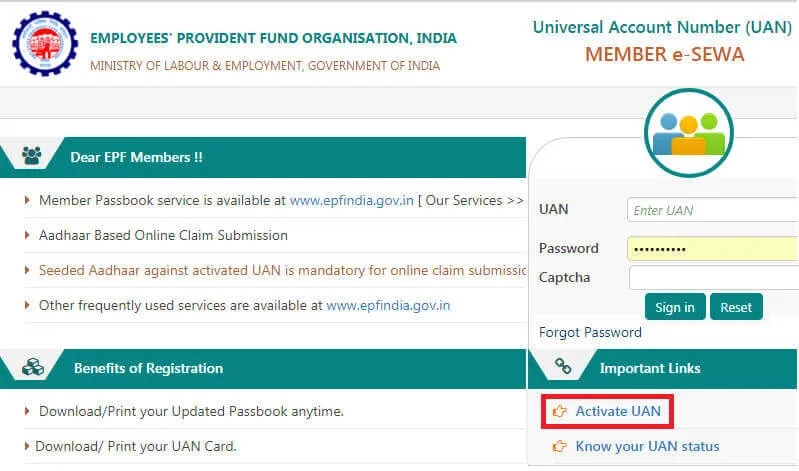
Step 1: Go to the EPFO UAN portal
Step 2: Click on Activate UAN
Step 1: Visit the EPFO Member Portal: unifiedportal-mem.epfindia.gov.in
Step 2: Click “Activate UAN” under Important Links
Step 3: Enter your UAN, Aadhaar number, full name, date of birth, and Aadhaar-registered mobile number
Step 4: Confirm consent for Aadhaar OTP verification
Step 5: Click “Get Authorisation PIN” → enter the OTP on your Aadhaar-linked mobile
Step 6: Create a password, must be 8–25 characters, alphanumeric, with at least 1 special character
Activation is complete. A confirmation is sent to your registered mobile.
Step 3: Verify using OTP
Step 4: Create a password
After this, you can use UAN log in services easily.
New in 2025: EPFO has enabled Face ID-based UAN activation via the UMANG app (effective August 1, 2025), allowing instant activation using facial authentication — no OTP or manual form required.
How to Login to UAN Member Portal (UAN Login)
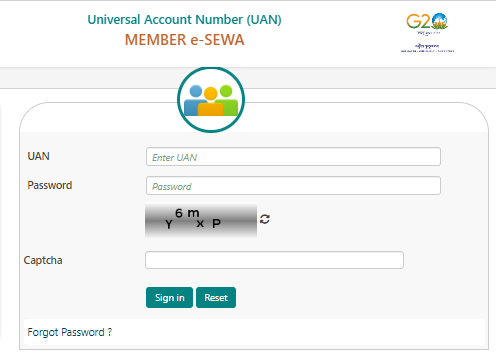
Step 1: Go to: unifiedportal-mem.epfindia.gov.in
Step 2: Enter your 12-digit UAN
Step 3: Enter your password
Step 4: Enter the captcha
Step 5: Click Sign In
UAN Password Change Process
If you forget your password or want to update it, Universal Account Number password change is simple.
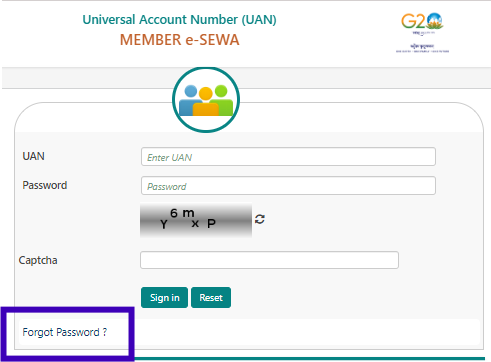
Step 1: Visit the UAN login page
Step 2: Click on Forgot Password
Step 3: Enter your UAN number
Step 4: Verify using OTP
Step 5: Set a new password
What is UAN KYC and Why It Matters
KYC (Know Your Customer) is the process of linking verified identity documents to your UAN. Without KYC, you cannot withdraw, transfer, or file claims online.
Documents accepted for UAN KYC:
- Aadhaar Card (mandatory for most services)
- PAN Card (mandatory for tax compliance and withdrawals > ₹50,000 after < 5 years of service)
- Bank Account Number +
- IFSC Code
- Passport
- Driving License
- Election Card (Voter ID)
- Ration Card
How to update KYC online:
- Go to Manage → KYC
- Select the document type, enter details, and save
- Aadhaar and PAN are auto-verified instantly
- Bank verification takes 1–3 working days via NPCI
- Employer approval then confirms the KYC (typically 3–5 working days)
2025 update: For most personal fields (name, gender, marital status), employer approval is no longer required if your Aadhaar is already verified. EPFO now supports self-editing of these details directly on the portal.
Why accurate KYC matters:
- Enables online PF withdrawal and transfer without employer attestation
- Reduces TDS rate from 34.608% to 10% on eligible withdrawals (when PAN is seeded)
- Prevents claim rejection due to mismatched name/DOB/bank details
- Required for ELI Scheme benefits (bank + Aadhaar linking)
How to Check PF Balance with UAN
You can do PF balance check with employee UAN number in multiple ways.
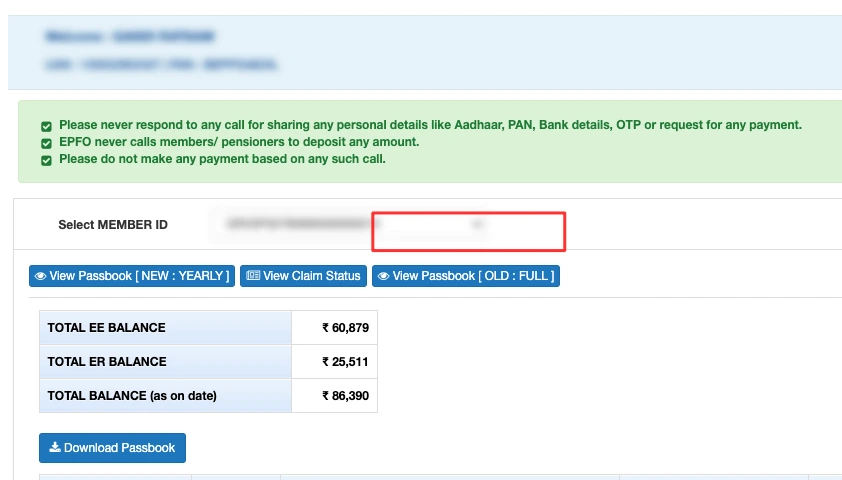
Method 1: EPFO Login Portal: Log in using your employee UAN number and password on the EPFO login member portal to view the balance.
Method 2: UMANG App: Use the UMANG app to access your EPF details linked to your Universal Account Number.
Method 3: SMS: Send “EPFOHO UAN ENG” to 7738299899 from your registered mobile number.
Method 4: Missed Call: Give a missed call to 9966044425 from your registered mobile number (Call disconnects automatically; you receive an SMS with your balance)
What is a UAN Passbook?
The UAN Passbook is an official statement issued by EPFO showing your EPF transaction history. It includes:
- Monthly employee contribution (12% of basic salary)
- Monthly employer contribution (split: 3.67% to EPF + 8.33% to EPS)
- Interest credited at the current EPF interest rate (8.25% for FY 2023–24)
- Total PF balance (EPF + interest)
- Withdrawals and transfers made
How to download: Log in → View → Passbook → Download PDF
EPF Contribution Rates
Understanding what goes into your UAN-linked EPF account:
Contribution | Rate | Goes To |
|---|---|---|
Employee contribution | 12% of basic salary + DA | EPF account |
Employer EPF contribution | 3.67% of basic salary + DA | EPF account |
Employer EPS contribution | 8.33% of basic salary + DA (max ₹1,250/month) | Employee Pension Scheme |
Employer EDLI contribution | 0.50% | Employee Deposit Linked Insurance |
Current EPF interest rate | 8.25% p.a. (FY 2023–24) | Credited annually to EPF |
The employer’s 12% total contribution is split – 3.67% goes to EPF and 8.33% goes to EPS (Employee Pension Scheme).
PF Transfer with UAN. How It Works
Automatic Transfer (From April 1, 2024)
Before April 2024, employees had to manually file Form 13 and wait for employer approval to transfer their PF when changing jobs. From April 1, 2024, EPFO has made EPF transfers automatic.
When you join a new employer:
- Your new employer updates your date of joining on EPFO’s portal
- The system automatically initiates a transfer from your old PF account
- No Form 13, no manual request needed
- The old account shows zero balance after the transfer
- Interest continues to accrue until the transfer is fully completed, no gap in earnings
Additional 2025 transfer improvements:
- Aadhaar-based e-Sign and e-KYC have replaced manual signature verification
- Exit date updates are now mandatory for employers, delays trigger compliance action
- One UAN rule is strictly enforced, duplicate UANs are flagged and deactivated
- Employer dependency has been removed for self-editing of member profiles
New EPF Withdrawal Rules (October 2025)
EPFO’s Central Board of Trustees approved major withdrawal rule changes on October 13, 2025:
Change | Old Rule | New Rule (Oct 2025) |
|---|---|---|
Maximum withdrawal | Partial limits applied | Up to 100% of eligible balance (employee + employer) |
Reasons for partial withdrawal | 13 separate grounds | 3 simplified categories: Essential needs, Housing, Special circumstances |
Education withdrawal frequency | Limited | Up to 10 times |
Marriage withdrawal frequency | Limited | Up to 5 times |
Minimum service for partial withdrawal | 5 years | 12 months |
Full withdrawal (unemployment) | After 2 months unemployed | After 12 months unemployed |
EPS withdrawal waiting period | Immediate | 36 months post-unemployment |
Claim settlement (online + KYC updated) | 7–15 days | 3–5 working days |
For 100% withdrawal, you must meet one of:
- Retirement (age 58)
- Remaining unemployed for 12+ months
- Other conditions specified under the EPF Act
TDS on PF Withdrawal
Condition | TDS Rate |
|---|---|
Withdrawal after 5+ years of continuous service | Nil |
Withdrawal < ₹50,000 | Nil |
Withdrawal ≥ ₹50,000, service < 5 years, PAN provided | 10% |
Withdrawal ≥ ₹50,000, service < 5 years, no PAN | 34.608% |
Form 15G/15H submitted (non-taxable income) | Nil |
Tip: Always ensure your PAN is seeded in your UAN KYC to avoid the maximum TDS rate.
EPFO 3.0 - What Changed in 2025
EPFO 3.0 went live on June 1, 2025, bringing significant upgrades:
- Faster claim settlement: Reduced to 3 working days for online claims with updated KYC
- ATM-style PF withdrawal (pilot): In select cities, members can withdraw PF via kiosk machines using Aadhaar and OTP- no forms, no queues
- Auto-approval for small claims: Claims under ₹50,000 with complete KYC are auto-approved (no employer sign-off)
- Face ID activation on UMANG: Instant UAN activation via facial authentication (from August 1, 2025)
- EPFO mobile app (expected April 2026): Aadhaar OTP-authenticated app enabling PF withdrawals within 24 hours
UAN and the ELI Scheme
The Employment-Linked Incentive (ELI) Scheme, introduced in Union Budget 2024–25, is directly linked to UAN activation:
- Scheme A: First-time employees registered with EPFO receive up to ₹15,000 (one month’s salary) in three instalments via DBT. UAN must be activated and bank account linked to Aadhaar.
- Scheme B: Incentives for first-time employees and employers in manufacturing, covering EPFO contributions for the first 4 years of employment.
- Scheme C: Employers get reimbursement of up to ₹3,000/month for 2 years for each additional employee with salary ≤ ₹1 lakh/month.
Key requirement: UAN must be activated and Aadhaar linked to your bank account to receive ELI scheme benefits.
UAN Member Portal: Where You Log In
Every UAN member gets an account on the EPFO UAN Member Portal at unifiedportal-mem.epfindia.gov.in.
This is your home base as a UAN member. Log in with your 12-digit UAN and password to:
- View and download your passbook
- Update KYC – Aadhaar, PAN and bank details
- File and track PF claims
- Transfer or link old PF accounts
New UAN members must activate the UAN once before any of these services work.
What Services Are Available on the UAN Member Portal?
The UAN Member Portal (unifiedportal-mem.epfindia.gov.in) offers:
- Check and download UAN Passbook
- Update KYC details (Aadhaar, PAN, bank account)
- Apply for PF withdrawal (Form 19, Form 31, Form 10C, Form 10D)
- Transfer PF accounts (now automatic; manual option also available)
- Download UAN Card
- View service history and member profile
- Track EPF claim status
- Update personal details (name, DOB, gender, self-edit if Aadhaar is verified)
- Link previous Member IDs
- File grievances via EPFiGMS portal
What To Do If You Have a Duplicate UAN
A duplicate UAN can arise if your previous employer did not update your date of exit before your new employer generated a new UAN. This causes confusion in transfers and withdrawals.
Resolution steps:
- Do not use both UANs simultaneously
- Immediately inform your current employer and the nearest EPFO office
- File a grievance on the EPFiGMS portal (epfigms.gov.in)
- Provide your Aadhaar and PAN for identity matching
- EPFO will deactivate the older/incorrect UAN and transfer the corpus to the correct one
From 2025, EPFO has made the one-UAN rule stricter, duplicate UANs are detected and flagged during ECR submission.
UAN for Employers: What HR Teams Need to Know
EPFO’s UAN system has specific workflows for HR and payroll teams:
Generating a UAN for a new employee:
- Obtain Form 11 (New Declaration) – the employee must declare any prior UAN
- If employee has an existing UAN: link the new Member ID to it
- If no prior UAN: EPFO auto-generates one after successful ECR submission
- Download the UAN list from the employer portal (UAN Menu → Download UAN List)
Employer responsibilities:
- File Electronic Challan cum Return (ECR) on time every month
- Update date of joining and date of exit for each employee on EPFO portal
- Approve employee KYC requests within 7–10 working days
- Use Digital Signature Certificate (DSC) for KYC approval
- Bulk KYC upload via text file is supported for large organisations
HRMS platforms like Zimyo automate this workflow, from capturing Form 11 during onboarding, to submitting ECR, tracking UAN status, and ensuring KYC compliance, reducing HR manual effort and preventing compliance gaps.
EPFO Universal Account Number and PF Transfers
With EPFO Universal Account Number, PF transfers have become faster and more paperless.
When you join a new company:
- Share your UAN with the employer
- New PF account gets linked automatically
- Old balance transfers without manual forms
Is Universal Account Number the Same as EPF?

No. UAN and EPF are different:
UAN | EPF | |
|---|---|---|
What it is | An identification number | A savings scheme / fund |
Nature | Permanent ID number | Monthly contribution account |
Changes on job switch | No | New account created each time |
Who manages it | EPFO | EPFO + employee + employer |
Frequently Asked Questions (FAQs)
How to know PF balance?
You can know your PF balance through the EPFO UAN portal, the UMANG app, the missed call service, or the SMS service. These options show your latest PF balance and contribution details once your Universal Account Number is active.
How to check my PF balance?
To check your PF balance, your UAN must be activated and linked with your mobile number. After that, you can log in to the EPFO portal or use the missed call or SMS facility to view your PF balance.
How to check PF balance with UAN number?
You can check PF balance with UAN number by logging in to the EPFO member portal using your Universal Account Number and password. After login, you can view your UAN Passbook which shows employee contribution, employer contribution, and interest earned.
How to activate UAN no?
To activate your UAN number, visit the EPFO UAN portal and click on Activate UAN. Enter your Universal Account Number, Aadhaar or PAN, and mobile number. After OTP verification, set your password and your Universal Account Number will be activated.
How to know PF balance by SMS?
To know PF balance by SMS, send EPFOHO UAN ENG to 7738299899 from your registered mobile number. You will receive an SMS with your PF balance and last contribution details.
How to check UAN balance?
Universal Account Number balance refers to the PF balance linked to your Universal Account Number. You can check it by logging in to the EPFO portal, using the UMANG app, or giving a missed call from your registered mobile number.
What is my UAN number?
Your UAN number is a 12-digit unique number given by EPFO. You can find it on your salary slip, by contacting your HR or employer, or through the EPFO portal using your Aadhaar or PAN details.
How to create a UAN ID?
Employees cannot create a Universal Account Number ID themselves. The employer generates the Universal Account Number when an employee joins the company. After that, the employee must activate the UAN on the EPFO portal to start using it.
What is this number 9966044425?
The number 9966044425 is the official EPFO missed call number. When you give a missed call from your registered mobile number, the call disconnects automatically and you receive an SMS with your PF balance and last contribution details. Your Universal Account Number must be activated to use this service.
What are the requirements to use the PF balance enquiry service?
To use the PF balance enquiry service through missed call or SMS, your Universal Account Number should be activated and your mobile number should be linked with Universal Account Number. Aadhaar, PAN, or bank details should also be verified for smooth access.
Can I withdraw 100% PF amount?
Yes, you can withdraw 100 percent of your PF amount if you meet EPFO rules such as retirement or remaining unemployed for more than two months. PF withdrawal can be done online through the EPFO portal using your UAN login.